Product_Detail
Back_to_Catalog
SlimDroid Linux
Linux x64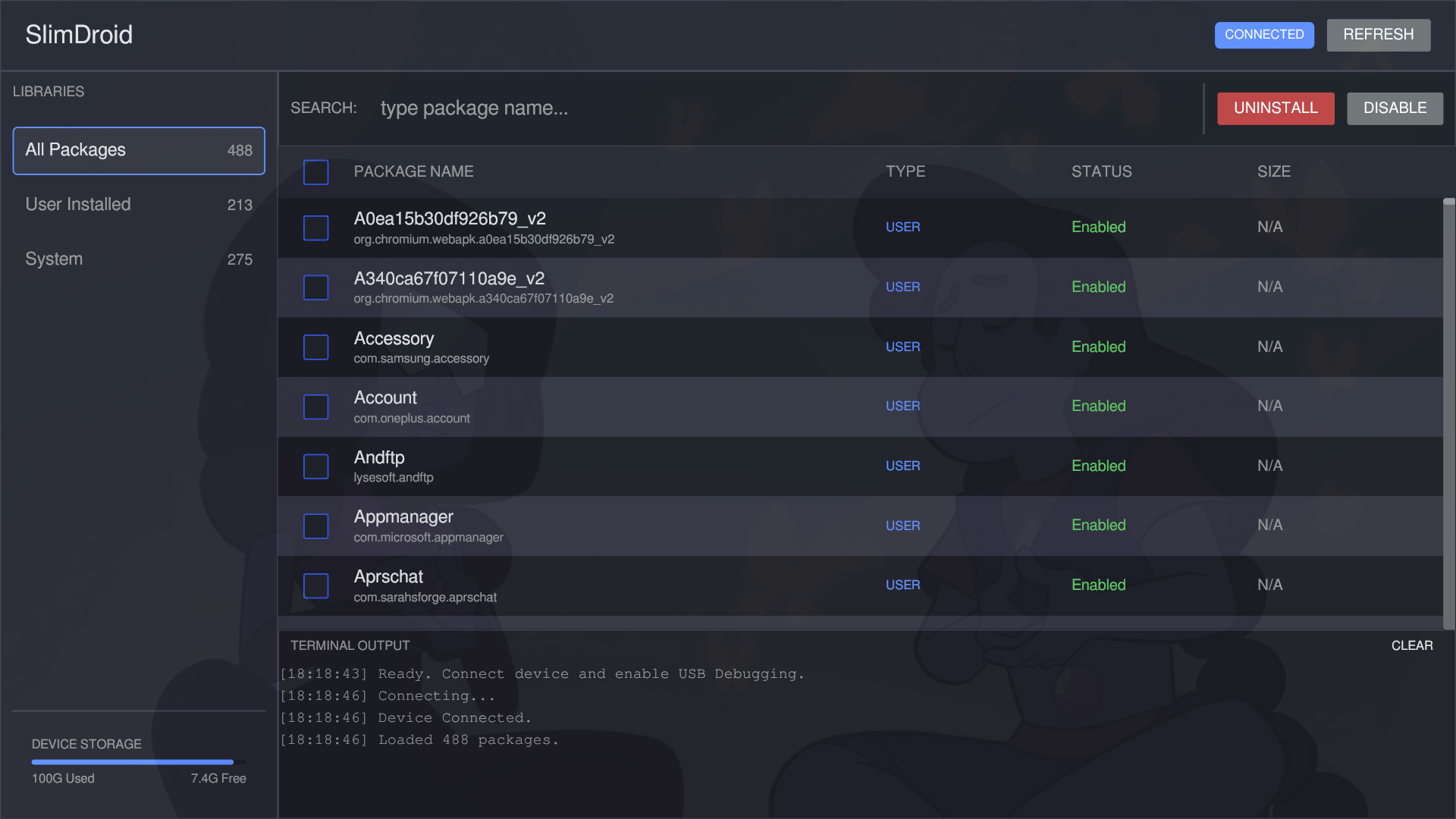
Purchase
$5.00
Stats
26
downloads
327
shares
Customers Also Bought
Description
# SlimDroid: Reclaim Your Android Experience
**SlimDroid** is a high-performance, open-source desktop utility built in **Rust** designed to help you debloat, manage, and optimize your Android device without the need for root access. It bridges the power of the Android Debug Bridge (ADB) with a modern, responsive GUI to give you full control over the applications installed on your phone.
---
### 🚀 Why SlimDroid?
Modern Android smartphones often come pre-loaded with unwanted "bloatware"—apps from carriers or manufacturers that drain battery, consume storage, and invade privacy. Removing these manually via the command line is tedious and risky.
SlimDroid simplifies this process into a safe, visual interface. Whether you are a privacy advocate, a minimalist, or just want to free up space, SlimDroid is your command center.
---
### ✨ Key Features
* **🚫 Rootless Debloating:** safely uninstall or disable system packages and user apps without rooting your device.
* **📦 Smart Package Management:**
* **Human-Readable Names:** Automatically converts cryptic package IDs (e.g., `com.facebook.katana`) into readable names (e.g., "Facebook").
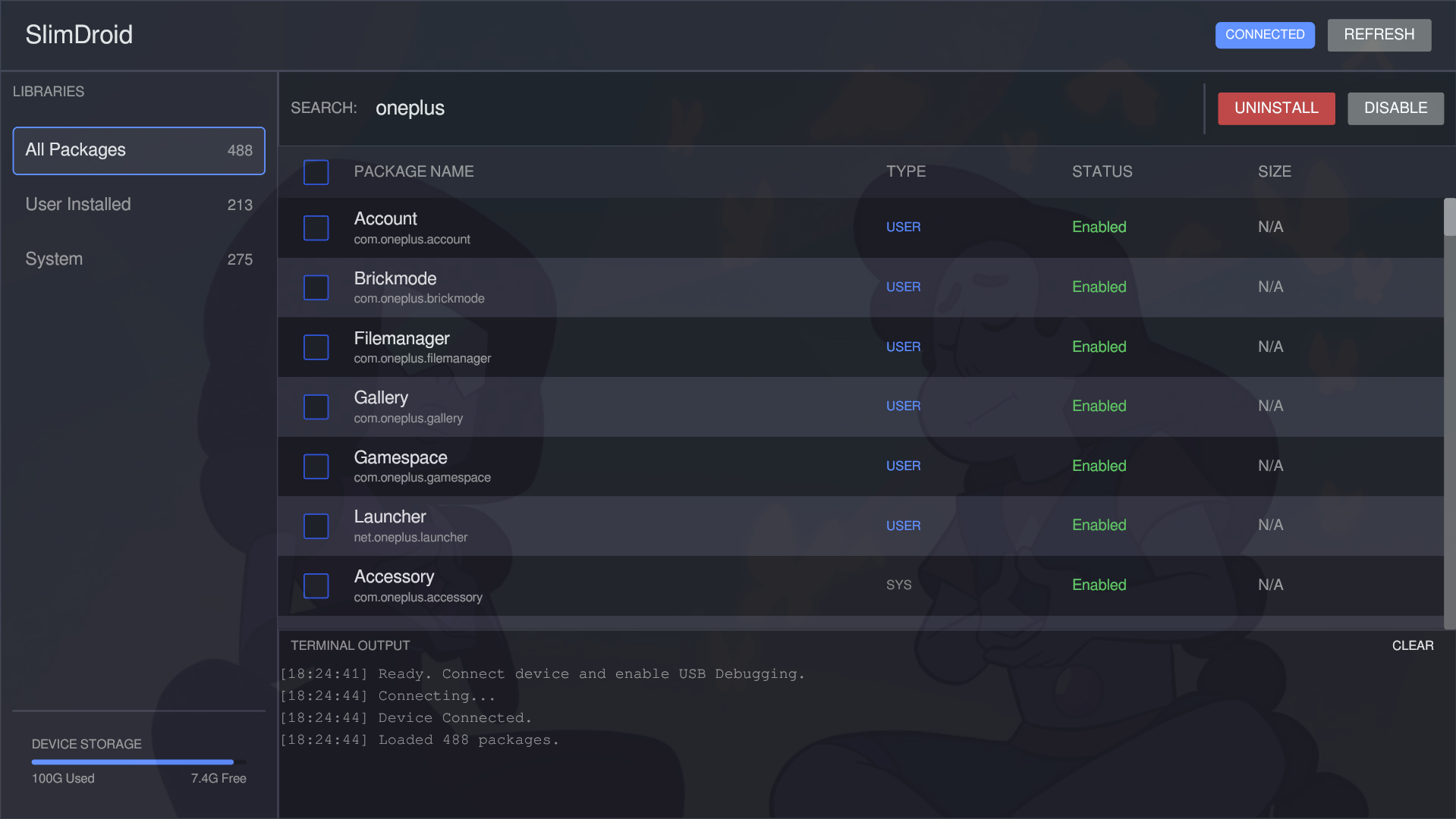
* **Intelligent Filtering:** Instantly filter between **User Installed** apps and **System** packages.
* **Search:** Rapidly find specific apps with a real-time search bar.
* **⚡ Batch Operations:** Select multiple apps and uninstall or disable them all in a single click. The UI remains responsive thanks to asynchronous background processing.
* **📊 Device Insights:**
* **Live Storage Tracking:** visual progress bar showing real-time used vs. free space on your device's user partition.
* **Connection Status:** Instant feedback on ADB connection security and authorization.
* **📝 Integrated Console:** A built-in terminal log shows you exactly what commands are being executed, ensuring full transparency.
---
### 🛠️ Technical Highlights
* **Built with Rust:** ensuring memory safety and blazing-fast performance.
* **Modern GUI (Iced):** Uses the `iced` library for a lightweight, cross-platform interface featuring a dark "Dracula-style" theme.
* **Async Core:** powered by `tokio` (via Iced's executor), ensuring the application never freezes while communicating with your device.
* **ADB-Native:** Communicates directly with the `adb` binary on your system path, adhering to standard Android security protocols.
---
### 🔒 Safety First
Unlike automated scripts that blindly delete list of "known bloatware," SlimDroid empowers **you** to choose. We intentionally removed automated "bloatware" categorization to prevent accidental removal of critical system components. You see exactly what is on your phone and decide what stays and what goes.
---
### 🏁 Getting Started
1. **Prerequisites:** Ensure `adb` is installed and added to your system PATH.
2. **Prepare Device:** Enable **Developer Options** and **USB Debugging** on your Android phone.
3. **Connect:** Plug in your device via USB.
4. **Run:** Launch SlimDroid. It will automatically detect your device, load your package list, and display your storage stats.
*Take back control. Slim down your droid.*
**SlimDroid** is a high-performance, open-source desktop utility built in **Rust** designed to help you debloat, manage, and optimize your Android device without the need for root access. It bridges the power of the Android Debug Bridge (ADB) with a modern, responsive GUI to give you full control over the applications installed on your phone.
---
### 🚀 Why SlimDroid?
Modern Android smartphones often come pre-loaded with unwanted "bloatware"—apps from carriers or manufacturers that drain battery, consume storage, and invade privacy. Removing these manually via the command line is tedious and risky.
SlimDroid simplifies this process into a safe, visual interface. Whether you are a privacy advocate, a minimalist, or just want to free up space, SlimDroid is your command center.
---
### ✨ Key Features
* **🚫 Rootless Debloating:** safely uninstall or disable system packages and user apps without rooting your device.
* **📦 Smart Package Management:**
* **Human-Readable Names:** Automatically converts cryptic package IDs (e.g., `com.facebook.katana`) into readable names (e.g., "Facebook").
* **Intelligent Filtering:** Instantly filter between **User Installed** apps and **System** packages.
* **Search:** Rapidly find specific apps with a real-time search bar.
* **⚡ Batch Operations:** Select multiple apps and uninstall or disable them all in a single click. The UI remains responsive thanks to asynchronous background processing.
* **📊 Device Insights:**
* **Live Storage Tracking:** visual progress bar showing real-time used vs. free space on your device's user partition.
* **Connection Status:** Instant feedback on ADB connection security and authorization.
* **📝 Integrated Console:** A built-in terminal log shows you exactly what commands are being executed, ensuring full transparency.
---
### 🛠️ Technical Highlights
* **Built with Rust:** ensuring memory safety and blazing-fast performance.
* **Modern GUI (Iced):** Uses the `iced` library for a lightweight, cross-platform interface featuring a dark "Dracula-style" theme.
* **Async Core:** powered by `tokio` (via Iced's executor), ensuring the application never freezes while communicating with your device.
* **ADB-Native:** Communicates directly with the `adb` binary on your system path, adhering to standard Android security protocols.
---
### 🔒 Safety First
Unlike automated scripts that blindly delete list of "known bloatware," SlimDroid empowers **you** to choose. We intentionally removed automated "bloatware" categorization to prevent accidental removal of critical system components. You see exactly what is on your phone and decide what stays and what goes.
---
### 🏁 Getting Started
1. **Prerequisites:** Ensure `adb` is installed and added to your system PATH.
2. **Prepare Device:** Enable **Developer Options** and **USB Debugging** on your Android phone.
3. **Connect:** Plug in your device via USB.
4. **Run:** Launch SlimDroid. It will automatically detect your device, load your package list, and display your storage stats.
*Take back control. Slim down your droid.*